Embedding Models#
This guide walks you through how to pick an embedding model for your OrcaCloud workload, configure it on a memoryset, and optimize its quality and performance. For the conceptual background on what an embedding is, how embedding models are trained, and what instruction-tuning and finetuning change, see the Embeddings concept guide.
Embedding models in OrcaCloud#
Embedding models in OrcaCloud are owned by memorysets. When you create a memoryset you pass it an embedding model, and from then on the memoryset uses that model to embed every memory it ingests and every query that arrives through predict. You rarely touch the embedding model directly outside of selection (“which candidate?”) and configuration (“which instruction? which context length?”).
Both PretrainedEmbeddingModel and FinetunedEmbeddingModel are handles. The model weights live on OrcaCloud, not in your SDK process. You never download weights, and there is no local inference path.
Model properties#
Every embedding model handle exposes the same core set of properties. These are the ones that determine how it will behave on your workload:
name: The model’s identifier, e.g.F2LLM_160MorHARRIER_270M.embedding_dim: Size of the vector the model produces. Determines both per-memory storage and approximate-nearest-neighbor lookup cost.max_seq_length: Maximum context length in tokens. Inputs longer than this are truncated. (1)num_params: Active parameter count. The primary driver of embedding latency and somewhat of quality.supports_instructions: Whether the model accepts an instruction to condition the embedding. (2)multilingual: Whether the model was trained on multiple languages.
- You can lower the effective limit per-memoryset with
max_seq_length_override, and pick which end of an over-length input is dropped withtruncation_side("right"by default, or"left"when the most informative tokens live at the end of the input, e.g. the latest turn in a chat transcript). You cannot raise the limit above the model’s architectural maximum. See Making predict faster for when capping the limit also speeds up queries. - For instruction-tuned models the instruction is set once on the memoryset and applied consistently to every insert and every query. See Writing instructions.
FinetunedEmbeddingModel additionally exposes id, base_model (the pretrained model it was finetuned from), created_at, and description. Its supports_instructions and multilingual properties are inherited from the base model.
Picking an embedding model#
The chart below plots every embedding model that OrcaCloud currently offers against its MTEB v2 classification score. The left panel is English-only, the right panel is multilingual. Each dot’s horizontal position is the model’s active parameter count (on a log scale), its size is the model’s maximum context length, its color is the model family, and an inner I marks models that support task instructions.
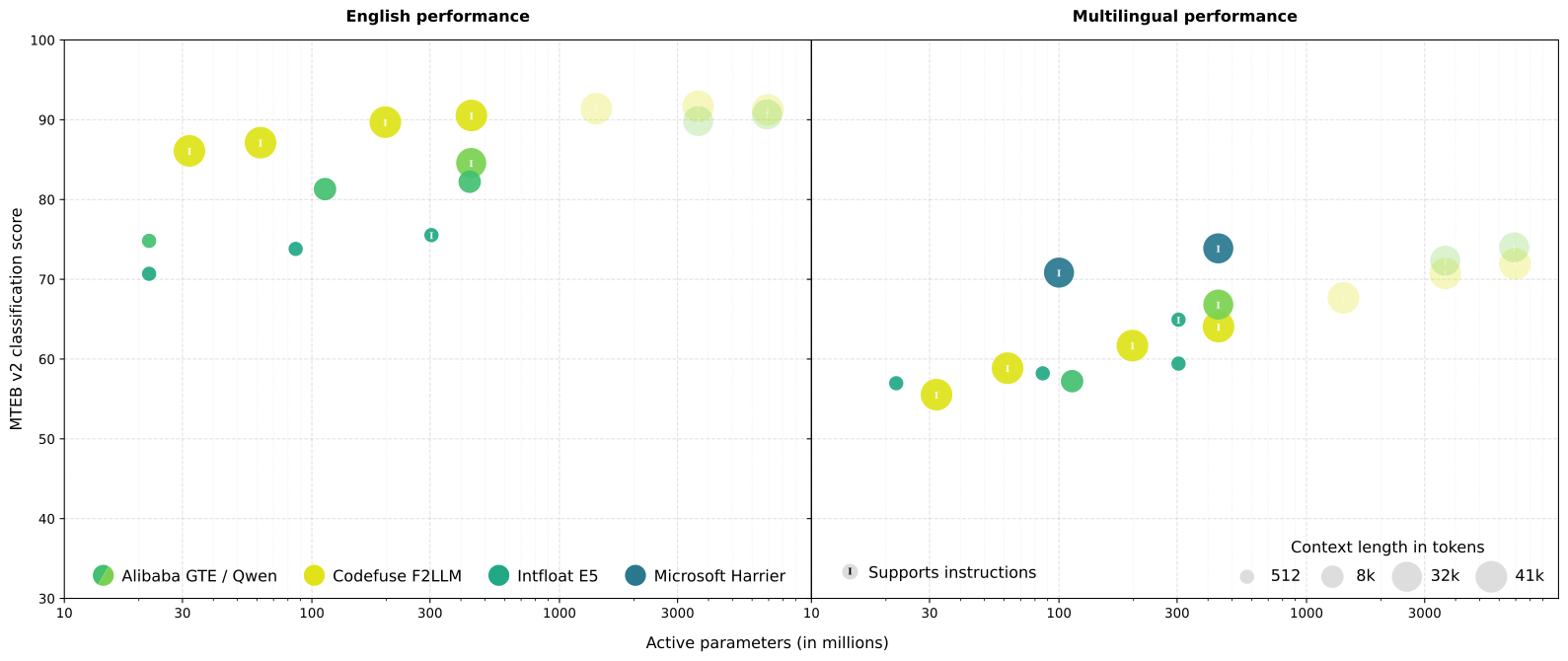
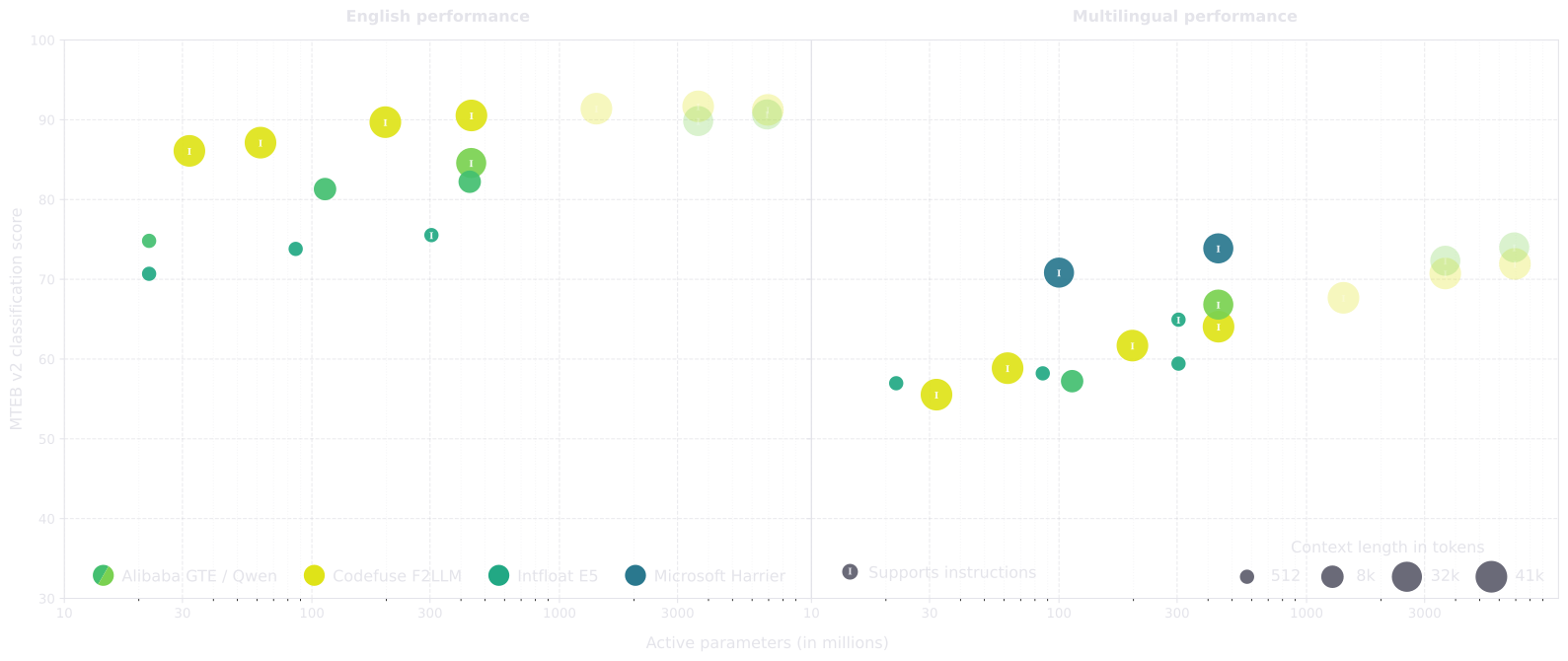
The faded dots on the far right of each panel are larger models that OrcaCloud does not currently offer. As the plot shows, their MTEB gains over their ~600M siblings are small while their latency and serving cost are several times higher, so we exclude them by default.
Harrier on the English panel
Microsoft has not published official English MTEB scores for the Harrier family yet, so HARRIER_* only appears on the multilingual panel. On our internal English-only evaluations, Harrier is broadly competitive with the similarly-sized F2LLM_* and QWEN_600M models, so don’t rule it out for English workloads just because it’s missing from the left panel.
A three-step selection workflow#
Use this workflow to pick a model rather than optimizing against the leaderboard directly. Within the filtered set of candidates, modern small embedding models cluster within a few MTEB points of each other. What matters far more is how they perform on your own data.
1. Apply the hard filters. These are the only two constraints that can outright disqualify a model:
- Language coverage: if any of your data is not English, drop every English-only model.
- Context length: estimate the p95 or p99 token length of your inputs and drop any model whose
max_seq_lengthis below it. Inputs longer than the limit are silently truncated, which will hurt retrieval quality.E5_*andGTE_SMALLmax out at ~512 tokens, the rest of the models can fit much longer inputs.
2. Shortlist two or three small models from different families and evaluate on your data. The goal at this step is to get a real signal from your own examples, not to argue about benchmark deltas. Pick small models from different families so your shortlist actually spans the design space, then run embedding_model.evaluate against a labeled datasource to get concrete classification or regression metrics. Pass the same instruction you plan to use in production so instruction-tuned models are measured with their intended prompt. Some starting shortlists:
- English, short-to-medium inputs:
F2LLM_80M,GTE_BASE, and optionallyE5_BASEif you may go multilingual later. - Multilingual:
HARRIER_270M,F2LLM_160M, andGTE_BASE_MULTILINGUALorE5_BASE(if your text is not too long). - Long documents:
F2LLM_160M,HARRIER_270M, andGTE_BASEif 8k tokens is enough.
3. Escalate only if needed. If the best small model in your shortlist still isn’t accurate enough, these are the levers to reach for, in order of expected impact:
- Add a task-specific instruction on an instruction-tuned model (
F2LLM_*,QWEN_*,HARRIER_*). Naming your domain and target unlocks meaningful accuracy on top of the placeholder default, with no training cost. See Writing instructions. - Finetune your best small model on your data. Finetuning can completely flip the ranking you’d read off the leaderboard: we regularly see a finetuned
GTE_BASEbeat much larger pretrained models on the same task, at a fraction of the latency and cost. Treat base-model MTEB as a starting point, not a ceiling. See the Finetuning guide. - Step up to a larger variant in the same family (e.g.
F2LLM_80M→F2LLM_160M→F2LLM_330M→F2LLM_600M,HARRIER_270M→HARRIER_600M). Expect modest gains at meaningfully higher latency and cost. Reach for this only after finetuning and instructions haven’t closed the gap.
The four families#
OrcaCloud’s catalog is organized around four families. Each family corresponds to one cluster on the landscape plot.
Codefuse F2LLM#
A modern, instruction-tuned, multilingual, 40k-context family with best-in-class English MTEB scores at every size. This is the family to start with for English-heavy workloads.
F2LLM_80M: maximum throughput, already beats everyGTEsize on English MTEB.F2LLM_160M: balanced English default.F2LLM_330M/F2LLM_600M: more headroom on harder tasks, at higher latency.
Microsoft Harrier#
A 32k-context, instruction-tuned family that is the strongest option on the multilingual MTEB panel. The family to start with for multilingual workloads.
HARRIER_270M: balanced multilingual default.HARRIER_600M: trades latency for top multilingual accuracy.
Alibaba GTE/Qwen#
Two related lines from Alibaba: a short-context encoder family and a newer instruction-tuned LLM-based sibling.
GTE_SMALL: older 512-token English distillation from the original GTE generation.GTE_BASE: 8k-context English encoder at ~100M active params with no instruction support. A strong finetuning baseline for English-only workloads where the size keeps both training and serving cheap.GTE_BASE_MULTILINGUAL: multilingual variant ofGTE_BASEat ~200M active params.GTE_LARGE: 8k-context English encoder at ~430M active params, in the same size class asQWEN_600Mbut English-only and without instruction support. Included for completeness.QWEN_600M: newer instruction-tuned, multilingual, 32k-context sibling. Reasonable second multilingual candidate alongside Harrier.
Intfloat E5#
A 512-token multilingual family that predates the others. Still useful as a third data point in a multilingual shortlist.
E5_SMALL/E5_BASE: lightweight multilingual candidates for shortlists at small sizes, no instruction support.E5_LARGE: the instruction-tuned variant of the family. Same 512-token context as the smaller sizes, so reach for it when you want instructions on an E5 model but can live with short inputs.
Working with pretrained models#
In practice, you rarely touch an embedding model directly. You pass one to a memoryset when you create it, and from then on the memoryset handles embedding generation for both inserts and predictions. Setting the model once on the memoryset is also the only way to guarantee that insert-time and query-time embeddings stay aligned.
- Dot notation provides IDE autocomplete for every pretrained model.
- Set on the memoryset at creation time so the same instruction is applied on every insert and every lookup. See Writing instructions.
You can also access a model by name, which is useful in dynamic code where the model is chosen at runtime:
Or list everything that is currently available:
The one other direct call on an embedding model that matters for selection is evaluate, which runs a nearest-neighbor evaluation against a labeled datasource so you can compare candidates on your own data without creating a memoryset for each one:
- Pass the same instruction you intend to set on the memoryset so instruction-tuned models are compared on equal footing with the prompt they’ll actually run with in production.
Writing instructions#
An instruction is a one-sentence task description that tells an instruction-tuned model what kind of similarity to optimize for: “same topic?” versus “same sentiment?” versus “same intent?”. OrcaCloud wraps your sentence into the model’s expected prompt format (Instruct: {instruction}\nQuery: ...) automatically, so you only need to write the sentence. The instruction-tuned families are F2LLM_*, QWEN_*, and HARRIER_*.
Where to set the instruction#
In OrcaCloud the instruction is a property of the memoryset. You pass it once to LabeledMemoryset.create (or ScoredMemoryset.create) and from then on it is applied automatically to every memory the memoryset ingests and to every query that comes in through predict. There is no per-call instruction knob to forget, and inserts and queries are guaranteed to use the same prompt by construction.
To change the instruction on an existing memoryset, for example to A/B-test a new phrasing or to re-embed against a different model, use memoryset.clone with a new instruction argument. Cloning without one inherits the source memoryset’s value.
How to write a good instruction#
A good instruction names three things:
- The text type or domain: what kind of input is being embedded (
customer support ticket,product review,news headline,code comment). Use domain-specific nouns.support ticketis better thantext. - The classification target: the attribute being classified (
intent,sentiment,topic,urgency). - The label set, but only when it is small (≤ ~6 labels). Long label lists stop helping and can actively hurt.
Phrasing rules:
- Start with an imperative verb (
Classify…,Determine…,Identify…) or use theGiven X, …pattern. - One sentence. Specific but compact.
- When in doubt, err on the side of being more specific about domain and target.
A handful of templates cover most cases:
Examples, in the wild:
Good
- Classify the sentiment expressed in the given movie review text.
- Classify the emotion in the Twitter message into one of six emotions: anger, fear, joy, love, sadness, surprise.
- Given a customer support ticket, identify the user intent.
- Classify a given Amazon customer review as either counterfactual or not-counterfactual.
Not so good
- Classify this text. Too generic, no domain, no target.
- Classify the support ticket into one of: billing_refund, billing_charge_dispute, billing_subscription, account_login, account_password, account_2fa, … (47 more). Label list too long.
- This is a sentiment classification task for movie reviews where the goal is to determine… Not an imperative, padded.
If you omit instruction on an instruction-tuned model, OrcaCloud falls back to a generic placeholder. These exist only to give the model something in the instruction slot (instruction-tuned models tend to be slightly worse when it’s left empty). They do not describe your task. Always pass a real instruction that names your domain and target.
Instructions and finetuning#
Once you finetune an instruction-tuned model on your data, the specific wording of the instruction will barely matter. Finetuning reshapes the embedding geometry around your labels and largely washes out the semantic conditioning the instruction was carrying before, so small rewordings stop moving the needle. Keep the instruction set on the memoryset though. Instruction-tuned models were pretrained to always receive an instruction prefix, and leaving the slot empty feeds them a kind of input they never saw during pretraining, which tends to hurt accuracy. The simplest recipe is to pick a simple, short instruction for the pretrained baseline and carry it into finetuning unchanged.
Finetuning#
Finetuning adapts a pretrained model to your data so that the embeddings capture the distinctions that matter for your task. Because it is almost always a bigger quality lever than either picking a larger model or tuning instructions, it is the first thing to reach for when a pretrained model is close but not quite good enough.
The simplest call only needs a name and training data:
For the full walkthrough, covering loss functions, hyperparameters, automated sweeps, sequence-length trade-offs, and best practices, see the Finetuning guide.
Managing finetuned models#
Open an existing finetuned model by name with FinetunedEmbeddingModel.open:
List all your finetuned models with FinetunedEmbeddingModel.all:
And delete embedding models you no longer need with FinetunedEmbeddingModel.drop:
- You cannot delete a finetuned model that is currently in use by a memoryset.
if_not_exists="ignore"prevents an error if the model has already been deleted.
Making predict faster#
Prediction latency is what most production workloads ultimately care about, and the embedding forward pass dominates the per-call cost of a typical predict. Levers that shrink or amortize it matter most. (Quality is its own axis, covered in the selection workflow and the Finetuning guide.)
- Batch your
predictcalls. Pass a list of values tomodel.predict([...])instead of looping over single calls. Inside the server, the whole batch goes through one embedding forward pass and one approximate-nearest-neighbor lookup, amortizing GPU scheduling, HTTP overhead, and lookup-cache setup across every item in the batch. The SDK client chunks the list into sub-batches ofbatch_size(default10, max50) automatically, so the only thing you need to do is handpredicta list. For any latency- or throughput-sensitive workload this is usually the single biggest win. - Pick a smaller model in the same family. The forward-pass cost scales roughly linearly with parameter count, so within a family, dropping from
F2LLM_600MtoF2LLM_160M(orHARRIER_600MtoHARRIER_270M) is typically cheap in quality (especially if you finetune) and large in latency savings. Model choice is a create-time decision viaembedding_model=...on the memoryset’screate. You cannot swap it afterwards without cloning to a new memoryset. - Pick a model with a smaller embedding dimension. Embedding dim doesn’t affect the forward pass, but it does affect the approximate-nearest-neighbor lookup and the bandwidth cost of shipping vectors around. At large corpus sizes (hundreds of thousands of memories and up) this starts to show up in end-to-end predict latency. Below that it rarely matters. Dim is tied to model choice (usually higher for larger models in the same family), so this lever mostly aligns with #2 above.
- Cap context length for long queries. Passing
max_seq_length_override=NtoLabeledMemoryset.create(orScoredMemoryset.create/memoryset.clone) caps the tokens processed on every embed the memoryset performs. For short queries (a tweet, a review) this is effectively a no-op because the embedder uses dynamic padding: each batch is already padded only to the longest actual input. It only moves predict latency when your queries are genuinely long (articles, chat transcripts) or when a rare long outlier is inflating otherwise-short query batches. Pair it withtruncation_side="left"when the tail of the input carries the most relevant signal (e.g. the latest turn in a chat transcript or the end of a log); the default"right"keeps the beginning and drops the tail, which matches how most documents front-load their topic.
Inspecting embeddings directly#
Direct embed calls are an advanced path for debugging, visualization, or custom similarity experiments. In regular usage, memorysets handle embedding generation automatically. You shouldn’t need to call embed yourself as part of a production pipeline.
The max_seq_length, truncation_side, and instruction keyword arguments on embed only shape that one exploratory call. They are not how you configure a real OrcaCloud workflow. Those knobs live on the memoryset, as max_seq_length_override, truncation_side, and instruction passed to create or clone (see Writing instructions and Making predict faster).